
The open email is the context
No copying the thread or explaining the background again.
Open the side panel and EasyAImail understands the email in front of you, identifies questions and next steps, recommends a suitable template, and builds a complete HTML email through conversation. Review it, then insert it into the active reply or compose draft.
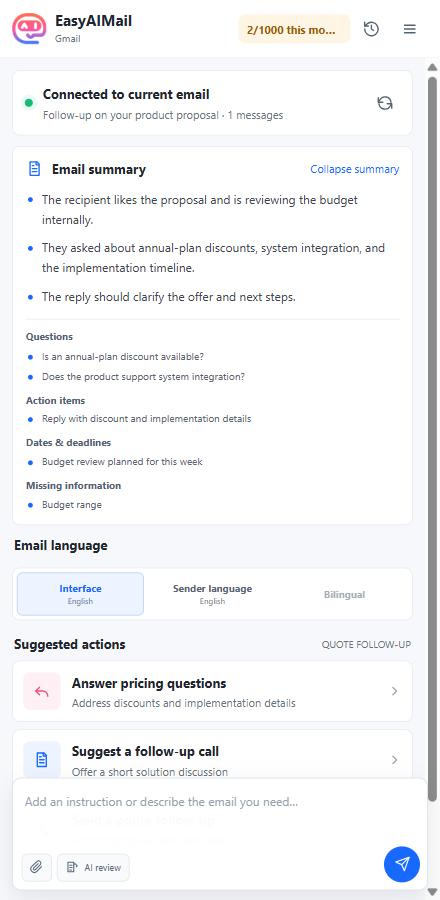
Watch the extension understand the current message, organize the next step, generate and revise an HTML email, then wait for your approval before inserting it into the mailbox draft.
No copying the thread or explaining the background again.
Questions, dates, actions, and missing facts are organized first.
Preview and approve it before anything enters your draft.
The extension reads the visible email only after you open it, then turns a long thread into information you can act on. A first-time user does not need to learn prompt writing.
When you open another email, the original conversation does not silently absorb the new content.
Every step happens in the side panel. You can see what the AI understood, what it is doing, and where the result will go.
EasyAImail does more than generate a paragraph. It recommends layouts for the purpose of the email, so the copy, hierarchy, and visual structure fit from the start. You can inspect the complete template before choosing it.
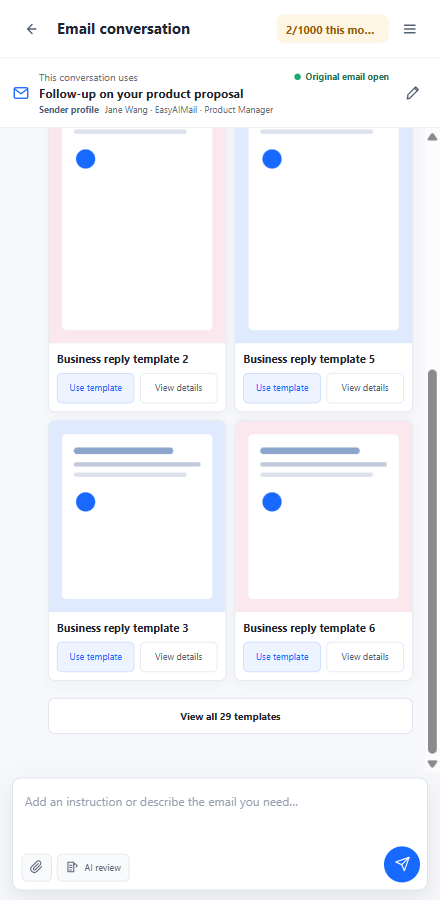
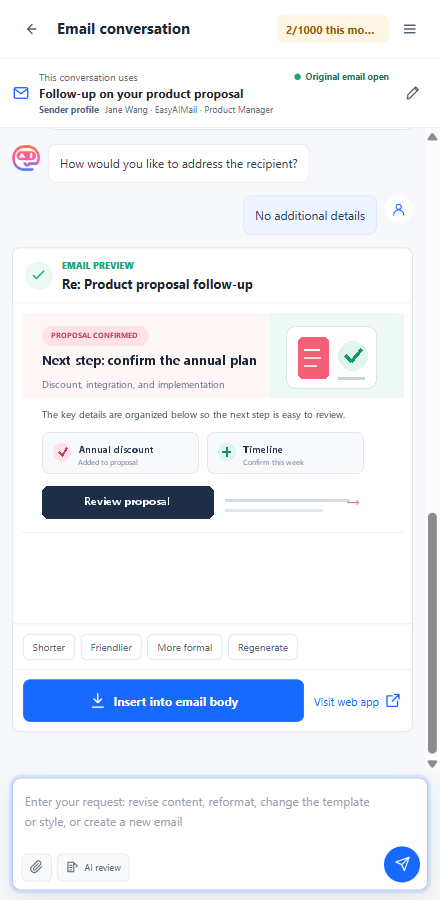
The extension does not pretend to be a visual editor. To revise a section, change the tone, shorten the copy, or replace the template, tell the AI what should change. Preview every result before inserting it.
You do not have to start with generation. When you have written a reply, run an AI review against the current email context, inspect the feedback, and decide whether to apply the improved version.
Review clarity, tone, missing information, and how well the reply answers the current email.
Flag wording that may be unclear, incomplete, too direct, or easy to misunderstand.
Review suggestions, a subject line, and a complete preview before replacing your current draft.
The reply confirms attendance clearly, but the request sounds abrupt and does not confirm the meeting details.
“Send the meeting link promptly” can be rewritten as a more natural and considerate request.
Re: Project follow-up meeting invitation
If the reply body is empty, the generated email is inserted directly. If content already exists, choose to keep it and append the generated email above as the newest reply, or replace the current reply body.
It does not send messages in the background. It places EasyAImail beside your mailbox and guides you through understanding, choosing, generating, confirming, and inserting.
Only read the visible email or draft while the extension is open.
The current email context stays bound to its extension conversation, separate from the web app.
Analyze the task, ask for missing facts, match a template, and generate the HTML email.
After you approve it, fill the currently adapted mailbox editor and send from your own mailbox.
The extension does not proactively read the current email to create a summary while it is closed.
Switching messages triggers a clear notice instead of mixing the new email into the old conversation.
The extension generates and inserts a draft; it does not use EasyAImail web SMTP or scheduled sending.
On adapted editors, detected draft content triggers a choice before insertion. Verified compatibility will be listed at release.
Current adaptation tests cover Gmail, Outlook, QQ Mail, NetEase Mail, Yahoo Mail, and iCloud Mail. Mailbox interfaces differ, so verified browser and provider combinations will be listed with each store release.
 ChromeIn testing
 Microsoft EdgeIn testing
 FirefoxIn testing
Not yet. The Chrome, Edge, and Firefox versions are still in testing, so this page does not provide placeholder store links.
No. It generates and inserts a mailbox draft. You still review and send the message from your own mailbox.
No. It reads the currently visible email or active draft only after you open the extension, for the current analysis and writing workflow.
Yes. Continue the conversation and describe the section, tone, template, or layout you want to change. The AI returns a new complete version to preview.
The extension is optimized for understanding an email, drafting a response, and inserting it without leaving the mailbox. The web app remains the fuller workspace for email management, templates, account settings, and advanced features.
The browser extension is still in testing. Use the complete web app today, or email us to request access to the extension beta.